AI VIDEO
Ein Haus, das sich selbst baut.
Ein leeres Fundament wird in fünfzehn Sekunden zur fertigen Villa: Steine fliegen an ihren Platz, das Dach fällt von oben herein, die Fenster rasen ins Bild. Gebaut ist das rückwärts, aus einem einzigen Bild vom fertigen Haus.
- 45 Min
- Fortgeschritten
ERGEBNIS
Das ist dabei rausgekommen.
- 1Ausgangsbild, aus dem alles andere abgeleitet ist
- 4Bauzustände, rückwärts erzeugt
- 15 sein durchgehender Take, kein Schnitt
- 0Takte Musik, nur Sound-Design
-
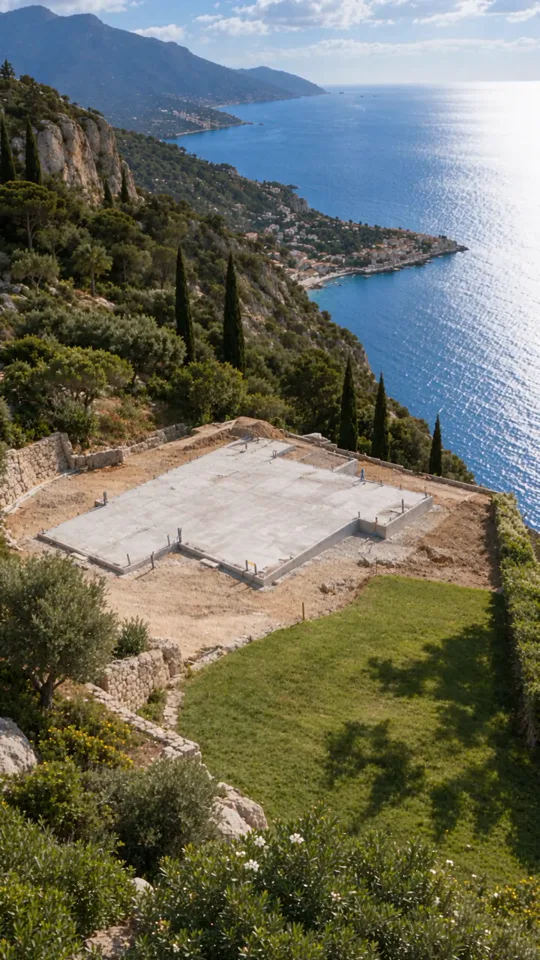 Fundament0:00 · Establisher
-
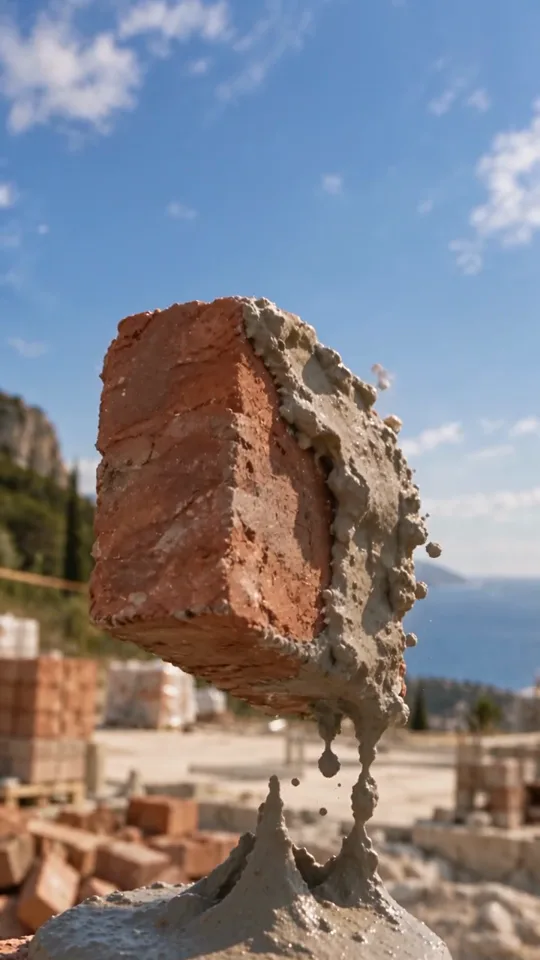 Zeitlupe0:02 · Speed-Ramp
-
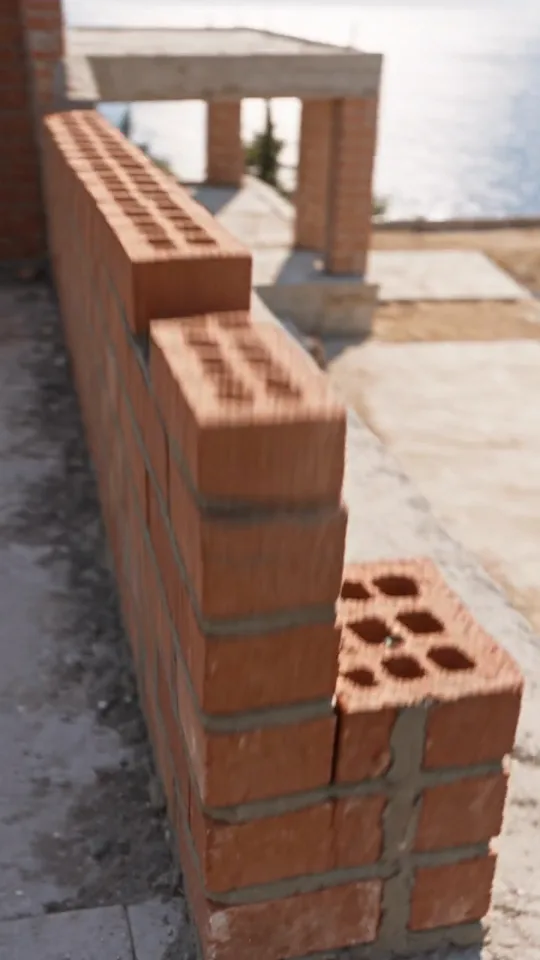 Mauerwerk0:08 · Orbit
-
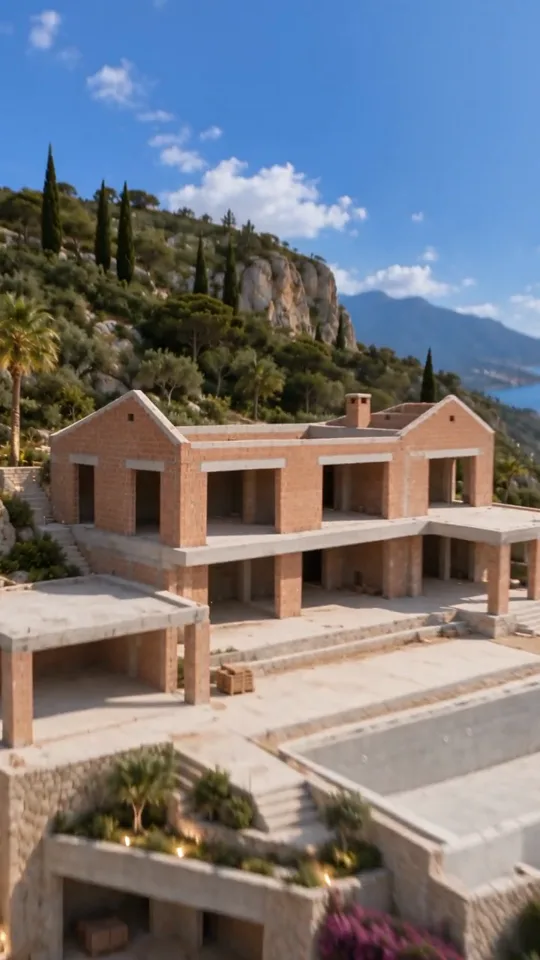 Dach sitzt0:10 · Pull-Back
-
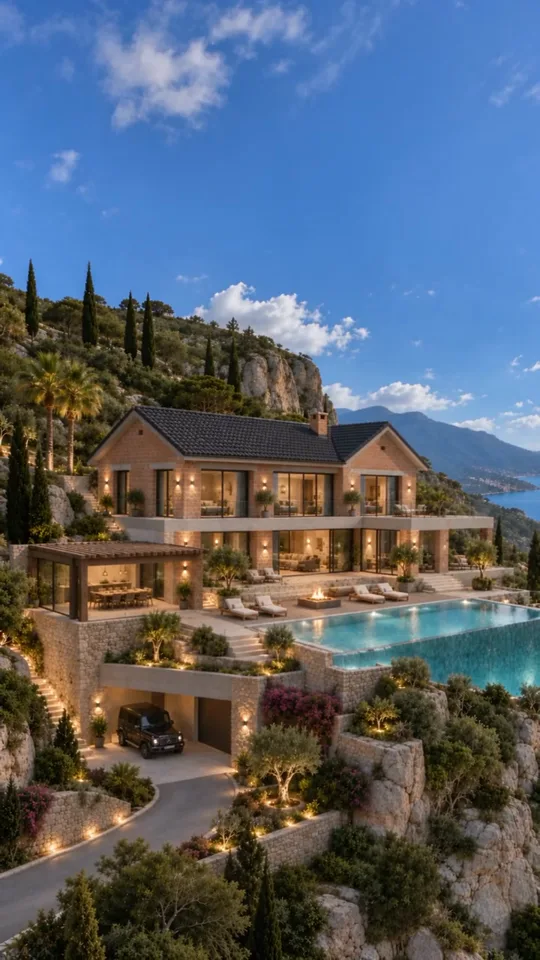 Fertig0:14 · Final Reveal
DIE KETTE
Fünf Bilder aus einem einzigen.
Bild 0 ist der Anker. Jeder der vier Bauzustände wird mit ihm zusammen erzeugt, deshalb stehen auf allen fünf Bildern dieselbe Kamera, dasselbe Grundstück, dasselbe Licht. In Seedance gehen dann nur Bild 1 bis 4 plus Bild 0 als Schlussframe in den Upload.
 ChatGPT
 Artlist
-
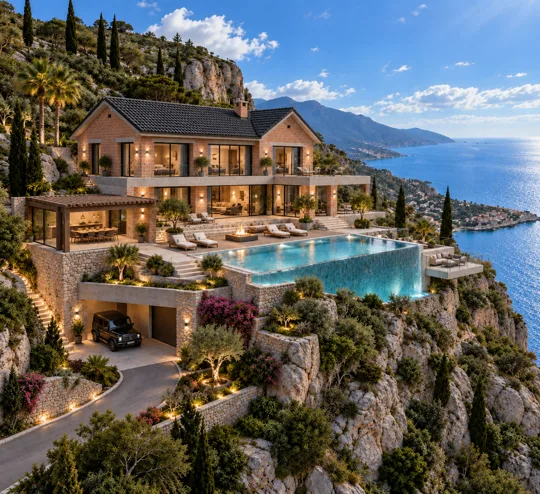 Bild 0 · Das fertige HausDer Anker, kein Prompt nötig
-
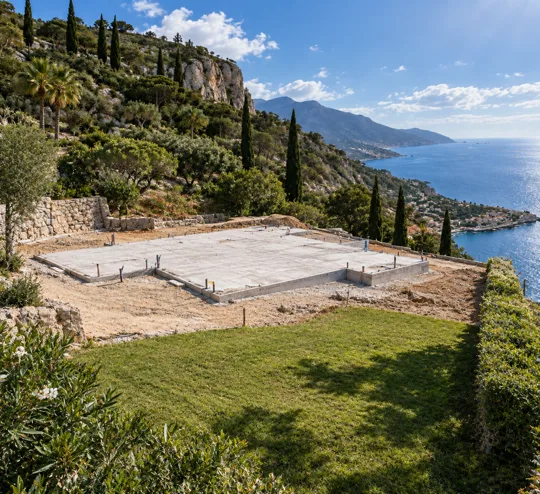 Bild 1 · FundamentUpload-Position 1
-
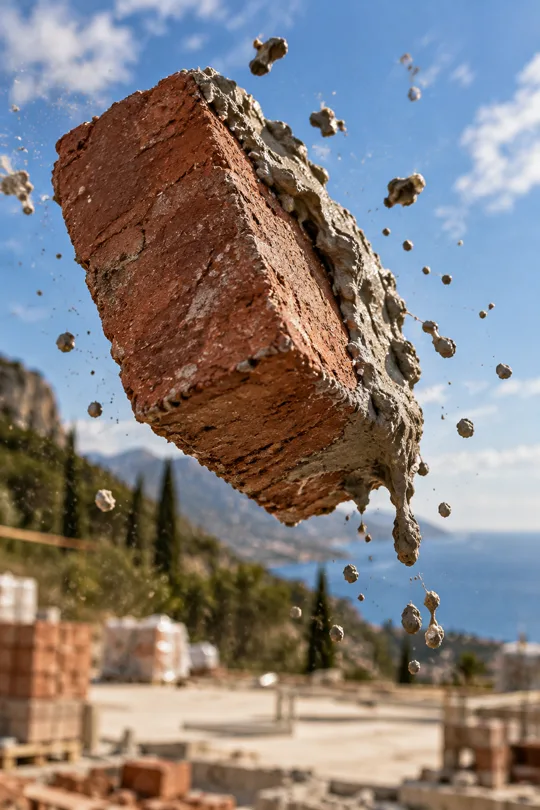 Bild 2 · Der fliegende SteinUpload-Position 2
-
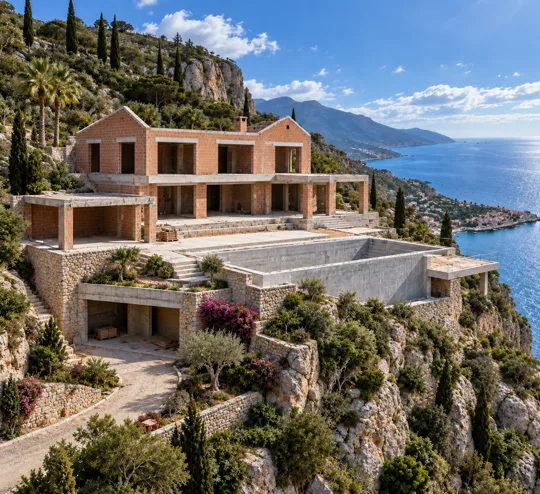 Bild 3 · Rohbau ohne DachUpload-Position 3
-
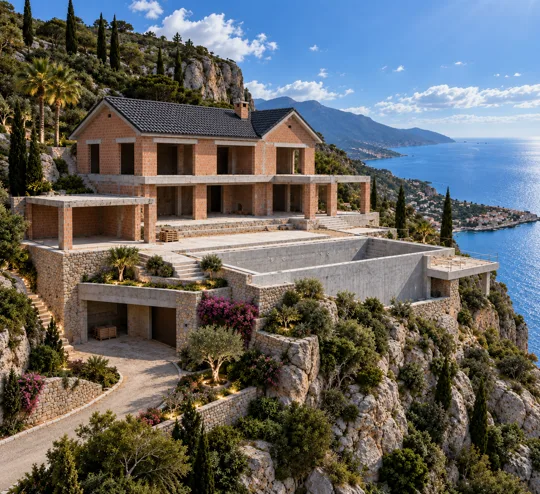 Bild 4 · Dach draufUpload-Position 4
ANLEITUNG
So baust du es nach.
-
Fang beim fertigen Haus an, nicht beim Fundament
Das ist der ganze Trick. Du brauchst genau ein Bild, auf dem das Gebäude fertig dasteht: Dach, Fenster, Licht, Umgebung, alles. Woher es kommt, ist egal: ein Rendering, ein Foto deines eigenen Hauses, ein Bild aus ChatGPT. Dieses Bild wird nie generiert, es wird nur benutzt. Alles Weitere ist der Rückweg von hier aus.
-
Schritt 1, das Fundament
Fertiges Haus als Referenz anhängen, Prompt 1 dazu. Entscheidend sind die drei Sätze, die im Prompt stehen:
same camera angle and position as the final house reference, dieselbe Hecke, dieselben Nachbardächer im Hintergrund, dieselbe Sonnenrichtung. Ohne diese Klammer bekommst du ein beliebiges Fundament irgendwo, und der spätere Clip springt. -
Schritt 2, der eine Stein in der Luft
Jetzt hängst du zwei Bilder an: das Fundament aus Schritt 1 und wieder das fertige Haus. Prompt 2 fragt kein Gebäude ab, sondern eine Makroaufnahme, ein einzelner Ziegel, eingefroren in der Luft, nasser Mörtel tropft in Bögen ab. Dieses Bild ist der einzige Grund, warum die Zeitlupe in der Mitte des Clips funktioniert: Seedance hat ein echtes Ziel für den langsamsten Moment.
-
Schritt 3, der Rohbau ohne Dach
Nur das fertige Haus als Referenz, Prompt 3. Er beschreibt sehr genau, was fehlt: kein Dach, offener Himmel über den Giebeln, alle Fenster und Türen als
dark, empty rectangular voids, noch kein Balkongeländer. Je klarer du benennst, was noch nicht da ist, desto weniger baut das Modell heimlich vor. -
Schritt 4: Dach drauf, sonst nichts
Zwei Bilder anhängen: fertiges Haus und Rohbau aus Schritt 3. Prompt 4 macht genau eine Änderung, das Dach. Der Rest wird ausdrücklich eingefroren:
All window and door openings remain dark, empty voids. Ein Bild, eine Änderung. Wenn du zwei Dinge gleichzeitig veränderst, siehst du im Video später einen Sprung statt eines Bauschritts. -
Die fünf Bilder in der richtigen Reihenfolge hochladen
In Artlist den AI-Bereich öffnen, Seedance 2.5 wählen, 9:16, 15 Sekunden. Dann die Bilder in genau dieser Reihenfolge anhängen: Fundament, fliegender Stein, Rohbau ohne Dach, Rohbau mit Dach, fertiges Haus. Die Reihenfolge ist die Regie, der Masterprompt spricht die Bilder über ihre Position an, nicht über ihren Dateinamen.
-
Masterprompt rein und einmal durchlaufen lassen
Der Masterprompt unten ist nach Sekunden gegliedert: Was passiert wann, wie bewegt sich die Kamera dabei, und welches Geräusch gehört dazu. Wichtig sind die beiden harten Regeln am Ende, die Kamera darf nie stehen, und es darf keine Musik geben. Beides muss explizit dastehen, sonst liefert das Modell Standardverhalten.
PROMPTS
Alles, was du brauchst.
@Create image Photorealistic architectural photograph, empty construction foundation site, wide establishing shot, same camera angle and position as the final house reference: three-quarter view from front-left. A flat concrete or poured foundation slab sits on the same plot of land — matching lawn edges, hedge line on the right, same neighboring rooftops visible in the distant background. No walls, no structure, only the bare foundation outline where the two-gable brick house will later stand. Bright sunny day, blue sky with scattered white clouds, same lighting direction as the reference (sun from upper right). Green lawn in foreground, patio area still bare earth or unfinished paving. Ultra-realistic, sharp detail, natural daylight, 8k photography.
@Create image Photorealistic macro close-up shot, a single reddish-brown brick tumbling in mid-air, frozen mid-motion, wet grey mortar peeling and dripping off one edge in slow arcs, tiny mortar droplets suspended around it. Shallow depth of field, background softly blurred showing a hint of blue sky and construction site. Warm natural sunlight catching the brick's rough clay texture, visible grain and imperfections on the surface. Dust motes drifting in the light. Cinematic, ultra-sharp on the brick, photorealistic, 8k detail.
@Create image Photorealistic architectural photograph, same camera angle and position as the final house reference: three-quarter view from front-left. A two-story brick shell of the exact same house — matching brick color, texture and layout of walls — fully built up to roof height, with both triangular gable ends formed in brick (the distinctive double-peak silhouette), but completely without a roof — open sky visible where the roof will go, exposed top edges of the brick gables. All window and door openings are dark, empty rectangular voids with no glass or frames installed yet — matching the exact size and position of the windows in the final house. No balcony railing installed yet, but the structural balcony slab/ledge between the two gables is visible in raw concrete or exposed brick. Same lawn, same hedge, same pool outline, same neighboring houses in background, same blue sky with clouds, same sunlight direction. Ultra-realistic, sharp architectural detail, 8k photography.
@Create image Photorealistic architectural photograph, identical to Image 3 in camera angle, brick shell, and surroundings, but now topped with the completed dark grey/black tiled double-gable roof exactly matching the final house — including the small chimney positioned between the two roof peaks. Roof tiles show realistic texture and slight variation, casting natural shadows. All window and door openings remain dark, empty voids — no glass, no frames, no balcony railing installed yet. Same brick walls, same lawn, hedge, pool outline, neighboring rooftops, blue sky with clouds, same sunlight direction as previous stages. Ultra-realistic, sharp architectural detail, 8k photography.
Seedance 2.5 — Masterprompt v2 Reverse-Construction Reveal · Brick House · 15s · Orbital camera fix + SFX-only sound design

**STYLE & FORMAT**
Hyper-dynamic cinematic reverse-construction VFX video, vertical 9:16, high-energy action-trailer pacing, photorealistic detail, warm autumn golden-hour lighting, aggressive motion blur on fast moves, one dramatic slow-motion speed-ramp beat, crisp architectural detail. The camera must be constantly, physically in motion — no locked-off static shots anywhere in this sequence.

**AUDIO DIRECTIVE (CRITICAL)**
NO music, no score, no ambient soundtrack of any kind. Sound design only — pure diegetic SFX, hyper-detailed and tightly synced to every single movement in the frame. Every impact, whoosh, scrape, and settle must have its own distinct, audible sound cue.

**REFERENCE FRAMES (5 images — upload in this exact order)**
@img1 — Wide establishing shot of the empty foundation site — full site visible, trees and sky for scale. @img4 — Macro speed-ramp reference — warm reddish-orange terracotta brick tumbling mid-air, wet mortar breaking off it. Matches Shot 2 exactly. @img3 — Full two-story brick shell with two gable peaks, open dark window/door voids, no roof. @img2 — Same shell topped with the dark tiled double-gable roof, openings still dark and empty. @img5 — Final frame — fully completed house, windows and door installed, warm interior light glowing. Keep the building's silhouette (twin gable peaks), reddish-orange brick texture, window/door placement, and green lawn/hedge backdrop fully consistent across all five stages.

**DURATION**
15 seconds, one continuous escalating sequence.

**SHOT-BY-SHOT BREAKDOWN WITH SYNCED SFX**

Shot 0 • 0.0s – 0.8s — Wide establishing shot Open on Image 1 as a genuine wide shot — the full empty foundation site visible in frame, trees and sky establishing scale and location. Camera holds just long enough to register the space before moving. SFX: Natural ambient wind, distant birds, quiet site tone.

Shot 1 • 0.8s – 1.6s — Hard push-in From the wide shot, the camera rockets forward and downward in one continuous fast move toward one corner of the foundation wall where bricks and fresh mortar sit, ending in tight macro framing. Must read as a single unbroken push, not a cut. SFX: Fast rising whoosh building in intensity, sharp low-end thump on the hard stop.

Shot 2 • 1.6s – 2.6s — SLOW-MOTION speed-ramp beat (matches Image 2) Time drastically slows (~20-25%) as a brick lifts and tumbles, mortar peeling off in slow arcs, dust motes drifting weightlessly, shallow depth of field. SFX: Deep time-stretched "thud-boom," wet "splurch" as mortar peels, soft "plip...plip..." droplets, low rumble underneath.

Shot 3 • 2.6s – 2.9s — Speed-ramp snap back Hard whip-cut to full speed — the brick slams into place. SFX: Sharp pitch-rise "whoosh-snap," crisp brick-on-mortar "clack-thud," tiny dust "pfft."

Shot 4 • 2.9s – 7.3s — Orbital circular brick-laying (key fix) Bricks lay themselves in continuous sequence around the entire perimeter of the footprint — not on one fixed wall. The camera performs a continuous, unbroken orbital flight around the rising structure, following the leading edge of construction as it circles each corner, spiraling upward with each completed layer. The camera must physically revolve around the building's exterior — alternating tight tactile passes with wider orbital arcs. By the end, the full two-story brick shell with its distinctive twin gable peaks stands complete on all sides, matching Image 3. SFX: Fast rhythmic brick-impact "clacks" and "thunks" (randomized timing/pitch), continuous mortar-squelch texture, low structural creak per row, a continuous orbital air-whoosh panning left-to-right-to-left as the camera circles, rising in pitch as it climbs.

Shot 5 • 7.3s – 8.3s — Pull-back reveal (new beat) Camera stops orbiting and flies backward and slightly upward in a smooth decelerating pull-back, opening into a wide shot of the fully built brick shell — two stories, twin gables, open dark window/door voids, still no roof. A clean, unmistakable "before" reveal, held just long enough to register. SFX: Whoosh decelerating into a soft settle, wind ambience returning, brief structural creak as the full shell is taken in.

Shot 6 • 8.3s – 10.3s — Roof drop Hard tilt up as the dark tiled roof structure plummets from directly above with a heavy vertical motion-blur streak, slamming onto the shell and forming both gable peaks with the small chimney between them. Dust and debris burst outward from the roofline, brief camera micro-shake. Matches Image 4. SFX: Fast air-cutting whoosh rising in pitch, massive deep "WHUMP," sharp tile-settling "crack," billowing dust "whoosh-hiss," quiet crackle as it settles.

Shot 7 • 10.3s – 13.3s — Windows & doors fly in from multiple directions Window frames and the front sliding glass doors rocket into place from clearly varied directions — some from screen-left, some from screen-right, one or two drop from above, and at least one flies in from the camera's own direction, rushing past/through the frame toward the viewer before snapping into place (radial motion blur near the lens). Each element's blur direction must match its flight path. Interior lights flick on the instant each piece locks in. SFX: Distinct incoming whoosh per element, panned to match direction (hard left, hard right, top-down, and a rushing near-camera whoosh-past), sharp glass-and-frame "snap-thud" on lock-in, metallic latch "click," soft electric "tick" for lights. Final door's impact is the heaviest, most resonant thud.

Shot 8 • 13.3s – 15.0s — Final reveal Camera settles into a smooth, stable wide shot of the fully completed house, matching Image 5 — golden-hour light on reddish-orange brick and dark roof tiles, black balcony railing in place, warm glowing windows. SFX: Construction sound fully drops out, clean ambient bed — wind through leaves, distant birds, faint warm window hum.

**CAMERA LANGUAGE (EXPLICIT CONSTRAINT)**
No locked-off or static shots at any point. Every shot must show continuous physical camera movement — push-ins, orbital arcs, pull-backs, whip pans, tilts. The orbital shot (Shot 4) is the centerpiece: the camera must visibly circle the building's perimeter as construction happens, not remain fixed on a single wall while bricks assemble in front of it.

**SPEED-RAMP MECHANIC (EXPLICIT)**
A deliberate, stylized ramp — fast approach → hard slow-motion hold on the flying brick/mortar (0.5-1.0s) → abrupt, sharp snap back to high speed. Punchy and intentional, like a high-end action-trailer speed ramp, not a smooth fade.

**MATERIAL DETAIL**
Bricks show visible wet mortar texture, dust, and physical weight on impact, warm reddish-orange terracotta color throughout; the roof reads as a solid, heavy structure with real dark tile texture; windows and sliding doors look physically substantial (glass reflections, black frame materials) as they lock into place.

**NEGATIVE PROMPT**
No static locked-off camera, no single fixed viewpoint during brick-laying, no jump-cuts between shots (only continuous camera motion or the explicit speed-ramp/hard-cut moments described), no music/score/soundtrack, silent impacts, mismatched SFX, melting/morphing geometry, warped proportions, floating unattached elements after landing, flickering facade, blurry indistinct materials, cartoonish physics.
SETTINGS
Die Einstellungen im Überblick.
| Plattform | Artlist, AI-Bereich |
|---|---|
| Videomodell | Seedance 2.5 |
| Bildmodell | ChatGPT, Bildgenerierung |
| Format | 9:16, hochkant |
| Länge | 15 Sekunden, ein Take |
| Referenzbilder | 5, Reihenfolge zwingend |
| Bild-Prompts | 4, das fünfte Bild ist der Ausgangspunkt |
| Ton | Sound-Design ohne Musik |
| Kamera | durchgehend in Bewegung, ein Orbit |
WORAUF ES ANKOMMT
Darauf musst du achten.
Rückwärts bauen hält die Kamera ruhig
Würdest du die fünf Bilder vorwärts erzeugen (Fundament, dann Mauern, dann Dach), driftet mit jedem Schritt etwas: die Blickhöhe, die Hecke, der Sonnenstand. Weil hier jedes Bild gegen dasselbe fertige Haus generiert wird, teilen sich alle fünf denselben Bildausschnitt. Genau deshalb liest Seedance die Abfolge als Baufortschritt und nicht als fünf verschiedene Grundstücke.
Die Upload-Reihenfolge ist die Regie
Im Masterprompt heißen die Bilder
@img1bis@img5, aber diese Nummern laufen nicht der Reihe nach, sie stammen noch aus der Reihenfolge, in der die Bilder entstanden sind. Was zählt, ist der Slot beim Hochladen. Die Listeupload in this exact orderim Prompt ist die verbindliche: Fundament, Stein, Rohbau, Dach, fertiges Haus.„Keine feste Kamera“ musst du hinschreiben
Ohne Ansage stellt das Modell die Kamera hin und lässt die Steine davor herumfliegen. Im Prompt steht deshalb zweimal dasselbe, einmal als Regel (
no locked-off static shots anywhere) und einmal im Negativ-Prompt (no single fixed viewpoint during brick-laying). Erst dadurch umkreist die Kamera in der Mitte tatsächlich das Gebäude, statt eine einzige Wand anzustarren.Musik muss man verbieten, Geräusche muss man bestellen
Seedance 2.5 legt von sich aus gern einen Score unter den Clip. Der Prompt verbietet das als eigenen Abschnitt (
AUDIO DIRECTIVE (CRITICAL)) und liefert im Gegenzug für jeden einzelnen Shot das gewünschte Geräusch mit: Whoosh beim Anflug, dumpfer Aufschlag beim Dach, Klicken der Fensterrahmen. Ein Reel ohne Musikbett lässt sich später mit einem Voice-over belegen, ohne dass sich zwei Spuren streiten.
Dein Gebäude, rückwärts gebaut.
Fünf Prompts, vier Bilder, ein Take. Du tauschst nur das Ausgangsbild und die Beschreibung von Material und Umgebung. Kameraführung, Bauablauf und Sound-Design bleiben, wie sie sind.
FAQ