AI VIDEO
Dein Spiegelselfie bekommt ein Dashboard.
Ein echtes Spiegelselfie, ein zweites Bild mit dem Interface, ein Prompt mit Sekundenplan: Higgsfield legt das Dashboard auf die Spiegelfläche, setzt Tracking-Punkte und zählt Volumen, Puls und Kalorien hoch. Acht Sekunden hochkant, ein Durchlauf, kein Schnittprogramm.
- 15 Min
- Einsteiger
ERGEBNIS
Das ist dabei rausgekommen.
- 2Bilder als Referenz
- 1Prompt, ein Durchlauf
- 8sLaufzeit, 9:16, mit Ton
- 0Schnitte in der Nachbearbeitung
-
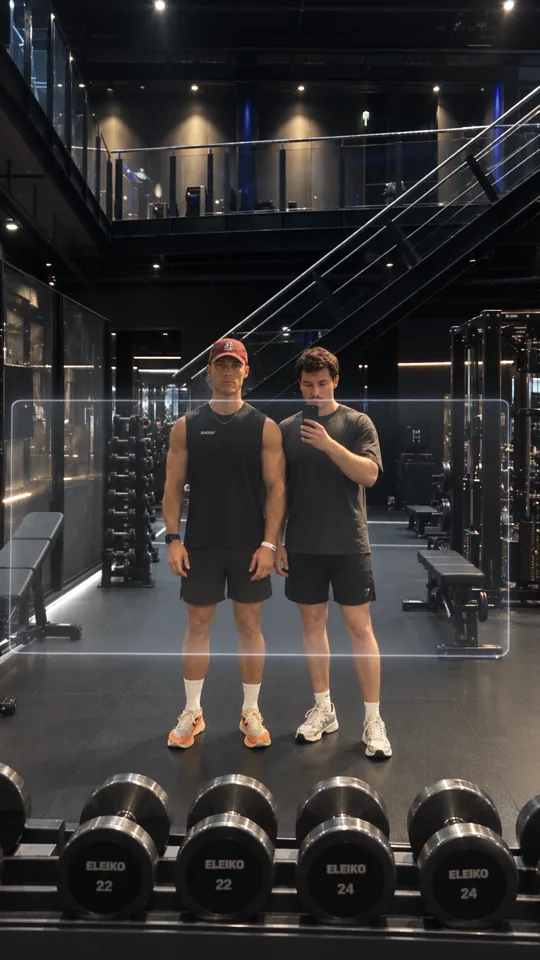 Noch fast das Originalfoto0,0 bis 1,0 s
-
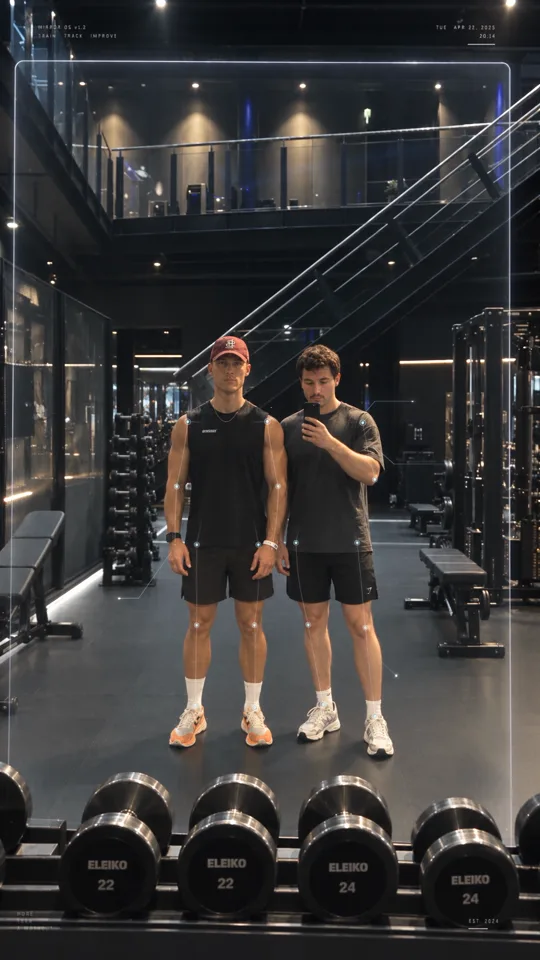 Tracking-Punkte setzen sich1,0 bis 2,2 s
-
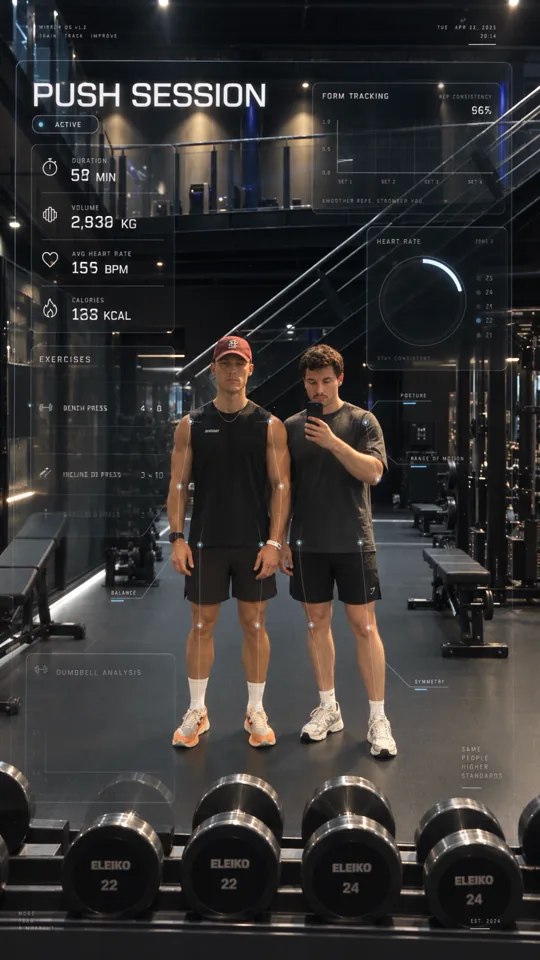 Die Werte zählen hoch2,2 bis 5,2 s
-
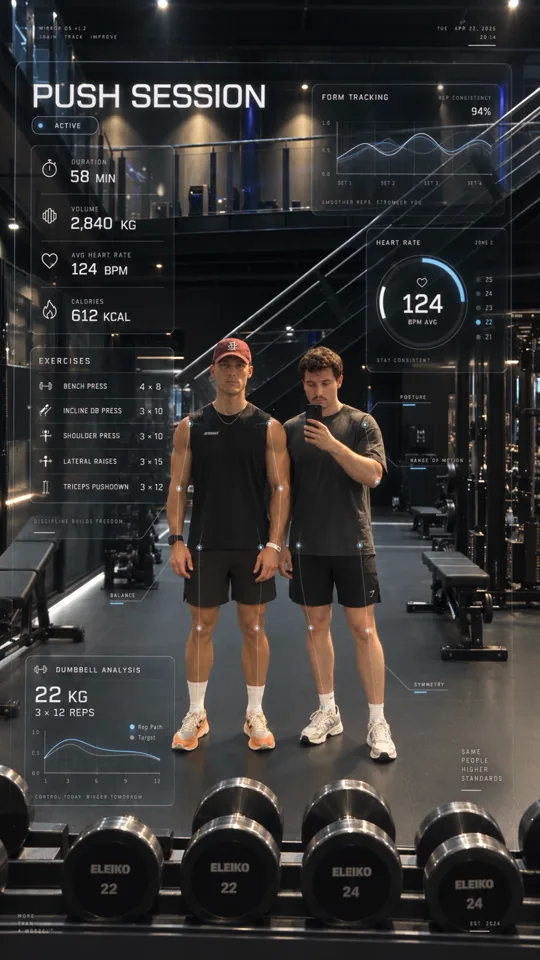 Endstand, alles steht6,6 bis 8,0 s
DAS BRAUCHST DU
Womit das gebaut ist.
 Higgsfield
 ChatGPT
-
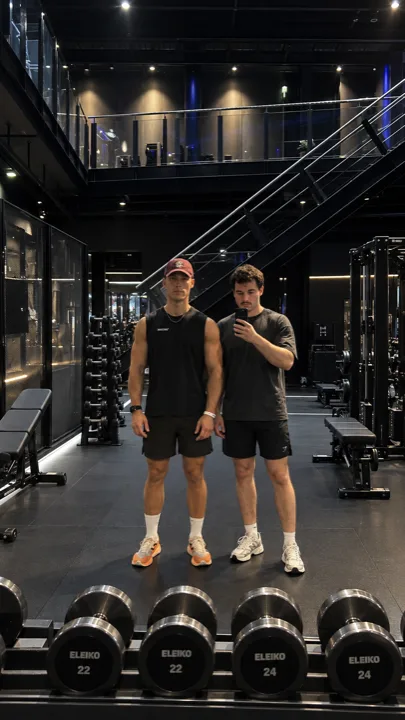 BILD 1 · das SpiegelselfieHandyfoto aus dem Studio, hochkant, beide ganz im Bild
-
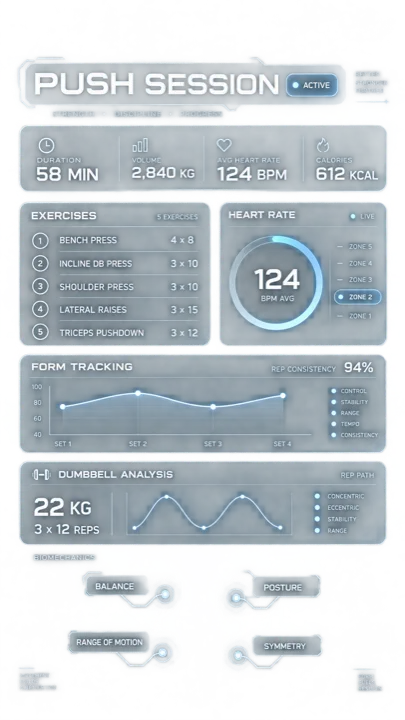 BILD 2 · das Interface als Vorlageaus ChatGPT, hochkant, nur die Oberfläche
ANLEITUNG
So baust du es nach.
-
Spiegelselfie im Studio machen
Das Ausgangsbild ist ein echtes Foto, kein generiertes. Hochkant halten, beide Personen ganz ins Bild, Abstand zum Spiegel, damit unter den Füßen und über den Köpfen Platz bleibt. Auf diese Fläche legt das Modell später das Dashboard, und was voll ist, kann es nicht beschriften. Gleichmäßiges Licht hilft, Blitz nicht: Ein greller Fleck im Spiegel frisst genau die Stelle, an der sonst die Kennzahlen stehen.
-
Das Interface in ChatGPT bauen
Den ersten Prompt in ChatGPT geben und ein hochkantes Bild anfordern. Heraus kommt kein echter Alphakanal, sondern eine Oberfläche auf hellem Grund, und das reicht: Higgsfield bekommt das Bild als Designvorlage, nicht als Ebene zum Drüberlegen. Wichtig sind die Zahlen, denn genau sie landen später im Video. Wer seine echten Werte zeigen will, tauscht sie hier aus, nicht erst im Videoprompt.
-
Beide Bilder in Higgsfield hochladen
Bei higgsfield.ai einloggen, als Modell Seedance 2.5 wählen und beide Bilder hochladen: zuerst das Spiegelselfie, danach das Interface. Die Reihenfolge entscheidet, weil der Prompt das zweite Bild ausdrücklich als Designvorlage anspricht. Im Text an der Stelle <<<image_2>>> ein @ tippen und das Interface-Bild auswählen, damit aus dem Text ein echter Verweis mit Vorschaubild wird.
-
Format, Laufzeit, Ton
9:16, 1080p, acht Sekunden, Ton eingeschaltet. Die acht Sekunden sind keine Geschmacksfrage: Der Prompt teilt sie in sechs Abschnitte von 0,0 bis 8,0, und jeder Abschnitt hat seine eigene Aufgabe. Stellst du fünf Sekunden ein, fehlen Pulsring und Hantelanalyse. Das Seitenverhältnis stellst du besser einmal bewusst ein, als es hinterher zu merken: Mein erster Lauf lief auf 4:3 und war damit unbrauchbar für Instagram.
-
Den Endframe gegen den Prompt halten
Zwei Kontrollen reichen. Erstens der letzte Frame: Stehen dort 58 MIN, 2.840 KG, 124 BPM und 612 KCAL, hat das Modell die Vorlage gelesen. Zweitens die Personen: gleiche Gesichter, gleiche Pose, Hand am Handy unverändert. Während des Hochzählens dazwischen erfindet das Modell Zwischenwerte, das ist normal und fällt in acht Sekunden niemandem auf. Bleibt der Endstand falsch, hilft ein zweiter Durchlauf mehr als ein längerer Prompt.
PROMPTS
Alles, was du brauchst.
Create a premium futuristic fitness-tech HUD overlay only, isolated on a transparent background.
Design a clean, ultra-premium, Apple Vision Pro-inspired gym performance interface for a mirror selfie scene.
The output must contain only the UI graphics, with no people, no gym background, no objects, and no solid backdrop.
Everything should be designed as a transparent glassmorphism overlay asset that can later be placed on top of a gym mirror photo.
STYLE
ultra-premium fitness technology commercial
transparent glass UI
white, soft grey and restrained ice-blue accents
extremely thin crisp lines
elegant minimal typography
photorealistic interface styling
clean layout with clear hierarchy
modern sports biomechanics visualization
no neon overload
no cyberpunk clutter
no game HUD look
LAYOUT
Create a balanced vertical 9:16 UI composition with the following modules:
Main title area
large title: PUSH SESSION
small status pill: ACTIVE
Main metrics panel
Include these metrics:
DURATION — 58 MIN
VOLUME — 2,840 KG
AVG HEART RATE — 124 BPM
CALORIES — 612 KCAL
Exercises panel
Add an EXERCISES panel with:
BENCH PRESS — 4 × 8
INCLINE DB PRESS — 3 × 10
SHOULDER PRESS — 3 × 10
LATERAL RAISES — 3 × 15
TRICEPS PUSHDOWN — 3 × 12
Form tracking panel
Add a clean line-chart module titled FORM TRACKING with:
smooth graph lines
x-axis labels: SET 1, SET 2, SET 3, SET 4
top-right value: REP CONSISTENCY 94%
Heart-rate module
Add a circular heart-rate gauge titled HEART RATE with:
center value: 124
sub-label: BPM AVG
zone indicator with ZONE 2 highlighted
Dumbbell analysis panel
Add a lower panel titled DUMBBELL ANALYSIS with:
22 KG
3 × 12 REPS
a small rep-path graph
Biomechanics callout elements
Add subtle small labels and callout markers such as:
BALANCE
POSTURE
RANGE OF MOTION
SYMMETRY
These should be minimal and elegant, designed to point toward a person later, but still look good as a standalone overlay.
IMPORTANT
Transparent background only
No filled opaque backdrop
No human silhouettes
No gym scene
No random floating clutter
No thick borders
No distorted text
Keep all text sharp and readable
Make the interface feel like a luxury mirror-based fitness operating system
Animate the uploaded gym mirror image into an 8-second ultra-premium cinematic fitness-tech reel.
In the second picture <<<image_2>>>  you see how i want the overlay look like.
Use the uploaded image as the exact base plate and preserve the scene composition.
IMPORTANT PRESERVATION RULES
Preserve the two real men exactly as shown in the image.
Do not change their faces, body proportions, clothing, posture, stance, phone, hands, shoes, cap, mirror framing, dumbbells, staircase, gym machines, room layout, or lighting.
The men should remain almost completely still, like a real mirror selfie.
No talking, no walking, no posing changes, no exercise movement.
The animation should come mainly from the transparent performance HUD attached to the mirror surface.

CAMERA
Keep the original framing
Vertical 9:16
Very subtle natural handheld phone movement only
Tiny cinematic parallax
Realistic mirror reflections
No zoom
No orbit
No camera rotation
No dramatic shake

ANIMATION TIMELINE
0.0-1.0 sec
Start almost like the original real gym mirror photo.
The interface is already present but very faint and semi-transparent.
A soft horizontal scan line moves slowly downward across the mirror.
Tiny particles briefly appear around the interface edges.
Very subtle light reflections glide across the glass UI panels.
1.0-2.2 sec
Body tracking activates.
Small clean tracking points softly appear on:
shoulders
elbows
wrists
hips
knees
ankles
Thin white and restrained ice-blue contour lines connect the points smoothly.
The tracking should feel like luxury biomechanics analysis, not a glowing skeleton.
Small labels such as BALANCE, POSTURE, RANGE OF MOTION, and SYMMETRY softly fade in and lock to their positions.
2.2-3.8 sec
The main dashboard becomes active.
The large PUSH SESSION title sharpens and brightens slightly.
The ACTIVE indicator softly pulses once.
The main stats panel animates in with elegant minimal motion:
DURATION counts up to 58 MIN
VOLUME counts up from 0 to 2,840 KG
AVG HEART RATE counts up to 124 BPM
CALORIES counts up to 612 KCAL
All number changes should be smooth, premium, and subtle.
3.8-5.2 sec
The secondary panels come alive.
Exercises panel
The EXERCISES panel becomes readable line by line, with each row appearing with a soft stagger:
BENCH PRESS — 4 × 8
INCLINE DB PRESS — 3 × 10
SHOULDER PRESS — 3 × 10
LATERAL RAISES — 3 × 15
TRICEPS PUSHDOWN — 3 × 12
Each line should fade in cleanly, without looking like a slideshow.
Form tracking panel
The FORM TRACKING graph begins drawing itself smoothly from left to right.
The graph lines animate elegantly across SET 1 to SET 4.
The REP CONSISTENCY 94% value becomes crisp and settles into place.
Tiny data points travel through the graph.
5.2-6.6 sec
The HEART RATE circular module activates.
The circular ring fills smoothly until it settles at 124 BPM AVG.
The ring should animate clockwise with a restrained ice-blue glow.
The heart rate zone indicator highlights ZONE 2.
Very subtle pulse motion continues inside the gauge.
At the same time, the DUMBBELL ANALYSIS panel becomes active:
22 KG
3 × 12 REPS
The rep-path line graph draws itself smoothly and then continues with subtle living motion.
6.6-8.0 sec
The full system is now active and stable.
Everything should remain alive with very subtle premium motion:
gentle graph movement
minimal pulse on tracking points
soft glass reflections
tiny moving particles
slight activity in the heart-rate dial
minimal telemetry updates
A soft light sweep travels once across the full interface.
The scene ends with the complete futuristic gym analytics system fully active.

VISUAL STYLE
Ultra-premium fitness technology commercial
Apple Vision Pro-inspired interface design
Luxury sports analytics
Transparent glassmorphism
Extremely thin crisp lines
White, soft grey, and restrained ice-blue accents
Minimal and elegant
Clean readable typography
Photorealistic
High-end commercial quality
The HUD must feel physically attached to the mirror surface.
Correct perspective, correct transparency, correct reflection behavior.
The interface must not float randomly in front of the camera.

NEGATIVE CONSTRAINTS
Do not add:
cheap sci-fi HUD
cyberpunk overload
gaming UI
heavy neon
random floating graphics
glitch effects
fast transitions
text distortion
unreadable typography
body deformation
face changes
extra fingers
moving gym equipment
moving people
morphing background
fake camera moves
aggressive shake
The final result should feel like a real gym mirror transforming into a high-end performance analysis system.
Das Interface sieht anders aus   -> Das zweite Bild ist nicht als Verweis gesetzt.
als mein Vorlagenbild              Im Prompt an der Stelle <<<image_2>>> ein @
                                   tippen und das Interface-Bild auswaehlen.

Falsche Zahlen im Endframe       -> Werte an beiden Stellen angleichen: im
                                   Interface-Bild und im Abschnitt 2.2-3.8 sec.
                                   Bei Abweichung gewinnt das Bild.

Das HUD schwebt vor der Kamera   -> Die Zeilen "The HUD must feel physically
statt auf dem Spiegel              attached to the mirror surface" und "must not
                                   float randomly in front of the camera"
                                   stehen lassen, nicht kuerzen.

Die Personen bewegen sich        -> Der Block "No talking, no walking, no posing
                                   changes" und "almost completely still" muss
                                   drin bleiben. Hilft das nicht: zweiter Lauf.

Gesichter veraendern sich        -> Ausgangsfoto mit groesseren, schaerferen
                                   Gesichtern waehlen. In 1080p hochkant sind
                                   Ganzkoerper-Gesichter klein und driften.

Nur die erste Sekunde passiert   -> Die Zeitfenster 0.0-1.0 bis 6.6-8.0 muessen
etwas                              vollstaendig im Prompt stehen und die Laufzeit
                                   auf 8 s eingestellt sein.

Clip ist quer statt hochkant     -> Seitenverhaeltnis im Werkzeug auf 9:16
                                   stellen. Die Zeile "Vertical 9:16" im Prompt
                                   allein reicht nicht.

Schrift im HUD ist unlesbar      -> Weniger Module im Interface-Bild. Fuenf
                                   Panels sind das Maximum, das in 9:16 noch
                                   scharf durchkommt.
SETTINGS
Die Einstellungen im Überblick.
| Plattform | Higgsfield |
|---|---|
| Modell | Seedance 2.5 |
| Bild 1 | echtes Spiegelselfie |
| Bild 2 | Interface aus ChatGPT |
| Format | 9:16 |
| Auflösung | 1080p |
| Dauer | 8s, sechs Abschnitte im Prompt |
| Ton | entsteht im selben Durchlauf |
WORAUF ES ANKOMMT
Darauf musst du achten.
Das zweite Bild macht den Unterschied
Meine ersten Durchläufe hatten nur das Spiegelselfie als Referenz, der Interface-Aufbau stand allein im Text. Das Modell hat daraus eigene Module erfunden: eine Anzeige WORK CAPACITY 87 %, ein Feld RECOVERY 18 H, dazu Zahlen, die nirgends im Prompt standen. Erst mit dem zweiten Bild als Vorlage saßen Aufbau und Werte. Ein Interface lässt sich schwer beschreiben und leicht zeigen.
Die Zeitleiste ist das Drehbuch
Der Prompt teilt acht Sekunden in sechs Abschnitte, und jeder bekommt eine Aufgabe: Scanlinie, Tracking-Punkte, Hauptzahlen, Übungsliste und Formkurve, Pulsring und Hantelanalyse, ruhiger Endzustand. Genau in dieser Reihenfolge läuft der Clip auch. Ohne diese Fenster passiert alles gleichzeitig in der ersten Sekunde, und die restlichen sieben stehen still.
Nur der Endstand stimmt wirklich
Im letzten Frame stehen alle Werte exakt so, wie sie im Prompt und im Interface-Bild stehen. Zwischendurch nicht: Bei Sekunde fünf zeigt der Clip 2.887 KG, 128 BPM und einen Pulsring mit 193, alles Zwischenstände, die das Modell beim Hochzählen selbst erfindet. Für ein Reel egal, für einen Standbild-Export nicht. Als Thumbnail deshalb immer den Schluss nehmen.
Stillstand muss man bestellen
Der ganze Abschnitt über die beiden Personen besteht aus Verboten: nicht reden, nicht gehen, Pose nicht ändern, Gesichter nicht ändern, Hand am Handy lassen. Dazu die Kameraregeln: kein Zoom, keine Drehung, nur minimales Handzittern. Das klingt übertrieben, ist aber der Grund, warum das Video wie ein echtes Selfie wirkt und nicht wie eine Animation. Die Bewegung kommt ausschließlich aus dem Interface.
Ein Foto vom Spiegel, acht Sekunden Dashboard.
Mach dein Spiegelselfie, lass ChatGPT das Interface bauen und schick beides mit dem Prompt durch Higgsfield. Länger als eine Viertelstunde dauert das nicht.
FAQ